The question
Most computer-use agents work from screenshots. At every step the model gets a picture of the screen, works out where things are, and sends back coordinates to click. It works, but every turn carries a large image, and a misread pixel becomes a misclick.
Linux already has another way to see a screen. Screen readers use AT-SPI, an accessibility interface where every window describes itself: its buttons, fields, menus and text, with their names and states. So this October I asked a simple question. Could an agent drive a Linux desktop from that structure instead of from pictures?
Parts of this exist already. Playwright's MCP server gives agents a web page's accessibility tree with refs, and a few MCP servers expose the accessibility tree of Linux and macOS desktops. Benchmarks like OSWorld have compared accessibility trees with screenshots since 2024, and two papers this year make the case for structure first. What I wanted to know was how far a purpose-built outline of the screen gets with current models, across many kinds of apps, measured against a screenshot agent. So I built a desktop to find out. I call it Blindsight for now.
What I was after
Reliability and range came first. The same agent should get real work done across many kinds of apps and on real websites, not just in one demo app. Then cost, since screenshots are expensive in tokens. Then small models, which I expected to gain the most from text.
Speed was a hypothesis, not a goal. I expected text to make an agent at least twice as fast, and I set that as a kill check: if it wasn't twice as fast at the same success rate, I would stop and write up why. It wasn't, and I come back to that below.
The design
The agent doesn't get a picture. It gets an outline of the screen: one short line per element, each with a ref, its state and its text. During one of my tests a web page opened a prompt. A screenshot agent would get it as a picture:
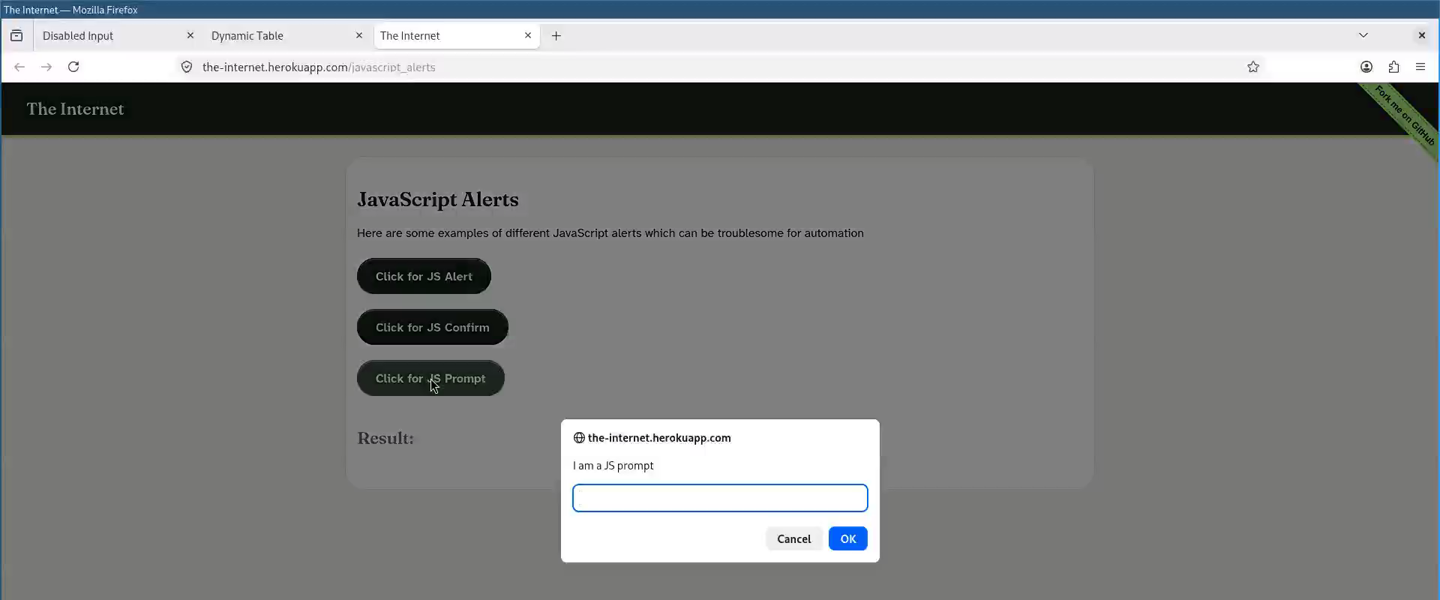
In the outline, the prompt is one line:
dialog "The page at https://the-internet.herokuapp.com says:" [e77]: I am a JS prompt | entry "I am a JS prompt" [e74] focused editable | button "Cancel" [e75] | "OK" [e76]The agent acts on refs: type into e74, click e76. Every action comes back with what changed and where the keyboard focus went, so it rarely has to look again. A picture comes only when the agent asks for one, or when a window has nothing to read, like a game or a drawing canvas. All of it goes through five tools: screen, act, find, read and look.
To know whether this is any better, I compared three setups on the same tasks:
- A: screenshots and coordinates, with Anthropic's own computer-use tools.
- B: the raw accessibility tree, handed to the model as it comes.
- C: the outline, with actions by ref.
B is there to show whether the tree alone is enough. It isn't.
Building it
I built it over four days, 19 to 22 October, with Claude Code writing the code and running the tests while I set the goals and checked the results.
Everything runs in one container: a Wayland desktop (sway) with about 50 apps across GTK3, GTK4, Qt 5, Qt 6, LibreOffice, Firefox and Electron, plus a driver that reads the accessibility tree and sends input.
Each toolkit fills in its tree differently, and those gaps are where most of the work went:
- Three Qt 5 apps never showed up on the accessibility bus at all. A small preload library fixes the two bugs that kept them off.
- Popup menus in GTK3 and Qt didn't say where they were on screen, so a menu item could only be run through its accessibility action, and that froze the app whenever the item opened a dialog. A 40-line patch to sway makes the compositor report the popups, so the click goes in by pointer, as a person's would.
- Firefox gives good trees, but needed its own care: privacy banners drawn over the page, links inside paragraphs, a PDF viewer that makes every printed line its own element.
An MCP server in the image serves the same five tools, plus one to open apps, so Claude Code or any other MCP client can use the desktop directly. Every session can be recorded: the screen as video, every tool call, and a page that replays both side by side.
What the numbers say
Across six held-out sets, 330 runs on Sonnet, the outline succeeded 322 times and screenshots 317, with about a third of the tokens and cost. It was faster, but nowhere near twice as fast.
I started with a suite of 24 tasks, three runs each, that I tuned the outline on. On Sonnet, screenshots passed 96%, the raw tree 79% and the outline 99%, at about a quarter of the screenshots' cost. On Haiku, the small model, screenshots passed 97%, the raw tree 71% and the outline 100%.
A suite you tune on proves little, so then came six held-out sets: 110 new tasks on apps and page patterns the outline had never seen. Each set was written and the outline frozen before any run, and faults were fixed only after the numbers. Three runs per task on Sonnet:
| Set | Tasks | Outline passed | Screenshots passed | Outline's time vs screenshots | Outline's tokens vs screenshots |
|---|---|---|---|---|---|
| 1 | 12 | 36 of 36 | 36 of 36 | 0.80 | 0.40 |
| 2 | 18 | 50 of 54 | 52 of 54 | 0.82 | 0.34 |
| 3 | 20 | 57 of 60 | 56 of 60 | 0.92 | 0.37 |
| 4 | 20 | 60 of 60 | 56 of 60 | 0.91 | 0.47 |
| 5 | 20 | 59 of 60 | 59 of 60 | 0.67 | 0.32 |
| 6 | 20 | 60 of 60 | 58 of 60 | 0.69 | 0.33 |
The outline matched or beat screenshots in five sets of six. In set 2 it missed two more, from two faults in the outline (fixed afterwards) and one API call that stalled. On Haiku, over sets 2 to 6, the outline passed 280 of 294 runs and screenshots 271. Haiku did better with pictures than I expected. Whether text helps more with smaller, local models, I haven't tested yet.
Speed is where my hypothesis failed. The outline took 0.67 to 0.92 of the screenshot agent's time, never half. It doesn't save model turns: the screenshot harness already returns a picture after each batch of actions, so both agents take about as many round trips, and the outline only makes each one about a quarter faster. The kill check triggered. I kept going anyway, because the outline was at least as reliable overall and used a third to a half of the tokens in every set.
The benchmark runs cost about $40 in API calls.
Then I ran 24 hands-on tests from a Claude Code session connected to the desktop, watching each one: six desktop tasks, eight everyday websites (Wikipedia, Hacker News, GitHub, the National Weather Service, OpenStreetMap, an arXiv PDF, DuckDuckGo and the Guardian), nine test and demo pages, and a drawing canvas. All 24 passed, and 8 needed a picture. They also turned up 31 rough edges the benchmark had never hit, from a privacy banner the outline cut off to tables that read as one long line, and I fixed each one.
Last, I tried a site I was signed in to. No agent ever types a password: I sign in myself, in a browser view of the desktop, and Firefox keeps its profile from one desktop to the next. I asked an agent which of my GitHub repos had changed in the past week, and how many commits each day. Its counts matched GitHub's API. A second run on a fresh desktop also counted commits on other branches. The two runs turned up eight more rough edges, and I fixed those too.
What's next
None of this is public yet. Next I'll publish the image, the tools and the benchmark, so anyone can run the tasks and check the numbers above.
The posts after this one go deeper on four parts: how I measured it and kept myself honest, how the outline is built, what it took below the accessibility tree, and two days of watching an agent use real websites through it.
The goal stays where it started: reliability and range first. Speed can wait.